
BackUp
"Not Another Effin' Back-Up Tool!"
At last! A backup application that works exactly the way I want it to!
After years of searching for a Windows® backup utility that did what I wanted, I ended up writing it. A familiar story. BackUp does everything I need, a lot of what I want, and does it pretty well. But don't take my word for it, try it for yourself, for free.
I've toyed with a great many Windows backup systems over the years, but none of them seem to fit my needs, or style of working. As well as a daily update of changed files, I like to take regular "snapshots" of work and settings, and in the end, the safest, most efficient method seems to be simply copying all your important files to a second location; keeping two copies. But I mostly don't want incremental or differential or totally new backups; I just want a single backup to stay up-to-date, synchronized, thanks.
Of course, this can all be done manually, but even the copying part can be hazardous; windows has a nasty habit of completely aborting a copy procedure if it can't copy even one single file, effectively leaving you in the crap, asking "so, what was copied, and what wasn't?"; most annoying, and a big time-waster. I used to use a tool called "Y-Copy" to get around this. There's also something called "unstoppable copier", that does a similar job. And while both are useful, they are extremely manual; I want a completely automatic solution, preferably on a schedule.
BackUp primarily acts as an ini-driven, pre-configurable "unstoppable copier" with optional synchronization. BackUp doesn't care if some file is locked, simply gets on with the next file. You can easily backup your entire home folder without having to worry about any of those pesky in-use system files halting the whole show.
BackUp has quite a few other tricks up its sleeve, documented here and inside BackUp's preferences file (BackUp.ini).
BackUp can handle LONG PATHS, that is paths beyond the Windows limit of 260 characters. BackUp will happily work with files having paths up to 32,767 characters long.
BackUp can do Hash verification of all the files it copies, using MD5 (or SHA-1/BLAKE2, which are overkill, but available!) hashing algorithms. If the copied file is not bit-perfect identical to the original, BackUp will delete it and try again. You can even configure how many times BackUp will attempt this.
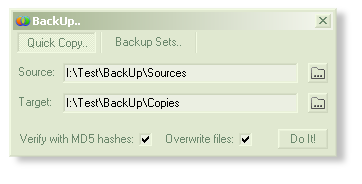
These days, BackUp has a GUI, that is, a Graphical User Interface. BackUp presents itself as a simple "Quick Copy" file copier, enabling you to copy files and folders, even whole disks with optional hashing for bit-perfect file verification.
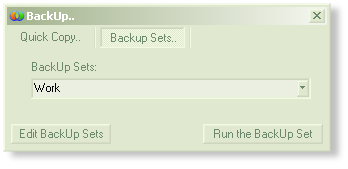
This is handy for quick tasks, utilizing the "Unstoppable Copying" part of BackUp. To unleash the full power of BackUp, head to the "BackUp Sets" tab. This simple interface enables you to interact with all your BackUp sets, edit and run them. Generally, you want these BackUp Sets to run on a schedule, in the background, but this is a handy place to test BackUp sets, get reports and more.
It's quite spartan, for now. Getting a GUI was quite an event for BackUp, and the initial command-line driven logic still underpins everything about backup, even its GUI.
 To get the most from BackUp, it is recommended that you read this document all the way through at least one time.
Download
PLEASE NOTE: This is ßeta software. Some work and testing is still required before a proper release. Basically, it may have bugs. Feel free to report them!
Great feedback = FREE license!
Also the documentation is a mixture of outdated and incorrect. New features remain undocumented. This all takes time!
Having said that, I rely on it every day for my own backups.
If you are up for it, a ßeta is available..
Welcome to the comments facility!