checksum
point-and-click MD5, SHA1 and BLAKE2 hashing for Windows..

verify data the easy way
The world's fastest hashing application, just got faster!
Welcome to checksum, a blisteringly fast, no-nonsense file hashing application for Windows, a program that generates and verifies BLAKE2, SHA1 and MD5 hashes; aka. "MD5 Sums", or "digital fingerprints"; of a file, a folder, or recursively, even through an entire disk or volume, does it extremely quickly, intelligently, and without fuss. Many people strongly believe it to be the best hashing utility on planet Earth.
Did I say fast? Not only mind-blowing hashing speeds (way faster than even the fastest SSD) but the quickest "get stuff done" time. With checksum you point and click and files, folders, even complete hard drives get hashed. Or verified. Simple. checksum just gets on with the job. Click-and-Go..
Available for 64 bit or 32 bit Windows (a basic Linux/UNIX/BSD version is also included).
Why?
In the decade before checksum, I must have installed and uninstalled dozens, perhaps hundreds of Windows MD5 hashing utilities, and overwhelmingly they leave me muttering "brain-dead POS!" under my breath, or words to that effect, or not under my breath. I always knew that data verification should be simple, even easy, but it invariably ended up a chore.
Either the brain-dead programs don't know how to recurse, or don't even pretend to, or they give the MD5 hash files daft, generic names, or they can't handle long file names, or foreign file names, or multiple files, or they run in MS DOS, or choke on UTF-8, or are painfully slow, or insist on presenting me with a complex interface, or don't have any decent hashing algorithms, or don't know how to synchronize new files with old, or have no shell integration or any combination of these things; and I would usually end up shouting "FFS! JUST DO IT!!!".
No more! Now I have checksum, and it suffers from none of these problems; as well as adding quite a few tricks of its own..
What is it for, exactly?
Peace of mind! BLAKE2, SHA1 and MD5 hashes are used to verify that a file or group of files has not changed. Simple as that. This is useful, even crucial, in all kinds of situations where data integrity is important.
For instance, these days, it's not uncommon to find MD5 hashes (and less rarely now, SHA1 hashes) published alongside downloads, even Windows downloads. This hash, when used, ensures that the file you downloaded is exactly the same file the author uploaded, and hasn't been tampered with in any way, Trojan added, etc.; even the slightest change in the data produces a wildly different hash.
A file hash is also the best way to ensure your 3D Printed propeller blade hasn't been "redesigned" to self-destruct!
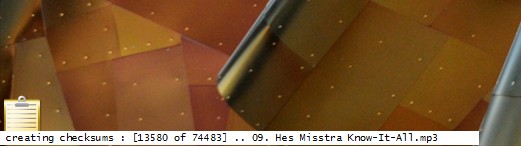
It's also useful if you want to compare files and folders/directories; using checksums is far more accurate than simply comparing file sizes, dates or any other property. For quick file compare tasks, there's also checksum's little brother; simple checksum, simply drag & drop Two files for an instant hash-accurate comparison.
If you burn a lot of data to CD or DVD, you can use checksum to accurately verify the integrity of your data right after a burn, and at any time in the future. If you distribute data in any way, maybe torrenteering your favourite things, run a file server of some kind, or just email a few files to your friends; hashes enable the person at the other end to be absolutely sure that the file arrived perfectly, 100% intact.
As well as providing secure verification against tampering, virus infection, file (and backup file) corruption, transfer errors and more, digital fingerprints can serve as an "early warning" of possible media failures, be they optical or magnetic. It was a hash failure that recently alerted me to a failing batch of DVD-R disks; I saved my fading data in time, and got a refund on the disks. I'll leave you to consider the million other uses. There's only one reason, though; peace of mind.
Absolutely no-nonsense file verification..
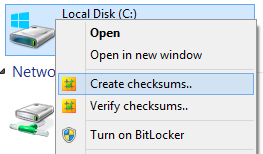
checksum can create (two clicks, or a drag-and-drop) or verify (one click) hashes of a file, a folder, even a whole disk full of files and folders in one simple, no-nonsense, high-performance operation. Basically, you point it at a file or folder and go! The parameters are controlled by command-line switches, but most folk won't have to worry about that; it all happens invisibly, and is built-in to your Windows® Explorer context (aka "concept", aka "right-click") commands (see above).
Note: while checksum operates with command-line switches, it is NOT a Windows® console application; there's no messy DOS box, or anything like that. But if you want to run it from a console, that's covered, too.
There are a wealth of command-line options, but most people find that checksum just works exactly as they would expect, without any messing about; right-click and go! But, if you are the sort who likes to customize and hack at things, you will find plenty to keep you occupied!
On-the-fly configuration..
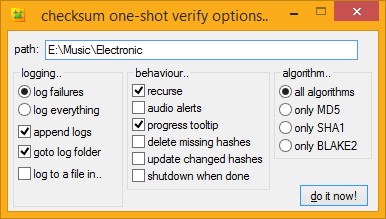
If you want to change any of checksum's options on-the-fly, simply hold down the SHIFT key when you select its Explorer context menu item, and checksum will pop up a dialog for you to tweak the process. If you want to have anything permanently set, checksum comes with standard plain text Windows ini file for you to tweak to your heart's content. Anyone smart enough to use MD5sums, can edit plain text.
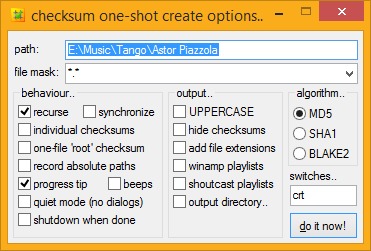
The options dialog is most useful when you want to only hash certain files in a folder, like mp3's, or movies. With your file mask groups, you can configure file-type specific hashing with just a couple of clicks.
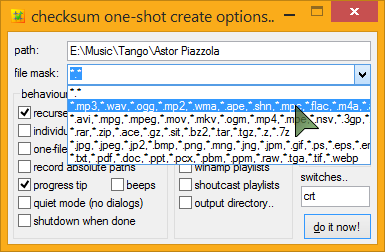 Common music, video, and archive formats come setup and ready to go, and you can easily edit or add to these at any time.
You pop up the options by holding down the SHIFT key when you select the explorer menu item, so it's easy to get to the advanced options whenever you need them. Same goes for verification, though generally you won't need it - checksum is smart enough to just get on with the job, verifying whatever checksum files it finds in the path, be they MD5, SHA1 or BLAKE2, or all of the above, and you'll probably never need to use anything but the default verify command, no matter how advanced you are! And because checksum recognizes other formats of MD5 and SHA1 files (there is no standard BLAKE2 format), it can be used not only to verify and create new checksums, but also verify existing checksum files, even ancient ones, automatically.
I expect there is some weird MD5 file format out there that I don't have an example of, Wang, maybe? but in practice, checksum supports ALL known MD5 verification file formats, that is, known by me. If you find an MD5 file format that checksum doesn't support, send me that file!!
There isn't really a standard SHA1 format yet, but checksum's is pretty good (it's the same as the output from a *NIX sha1sum command in binary mode). Shall we?
100% Portable..
checksum usually operates as a regular installed desktop application with Explorer context menus, custom .hash, .md5, .sha1 and .blake2 desktop icons, Windows start menu entries, and so on; but checksum can also operate in a completely portable state, and happily works from a pen-drive, DVD, or wherever you happen to be; no less than total portability.
Even with its little brother, simple checksum tagging along, the whole lot fits easily on the smallest pen-drive (the 32 bit version will UPX onto a floppy disk!), enabling you to create BLAKE2, SHA1 and MD5 hashes, wherever you are. To activate portable mode, simply drop a checksum.ini file next to checksum.exe (or run one-time with the "portable" switch), you're done.
It's no problem to run checksum both ways simultaneously, or to run checksum in portable mode on a desktop where checksum is already installed. Simply put, if there's a checksum.ini next to it, checksum will use it, and if there isn't an ini there, checksum uses the one in your user data folder (aka. "Application Data", aka. "AppData").
If you like applications to run in a portable state, even on your own desktop, no problem; you can skip the installer altogether and simply copy the files (checksum.exe and simple checksum.exe) to wherever you like. They are in the installer's files/ directory inside the main zip archive. There's also a checksum.ini inside the archive, so you can unzip-and-go.
Note: Regardless of whether you install checksum or run it in a portable state, its functionality is identical.
Introducing.. The Unified Hash Extension™
And Multi-Hashing™..
checksum uses the MD5, SHA1 and BLAKE2 hashing algorithms, and can create .md5 and .sha1 and .blake2 (or .b2 or whatever you use) files to contain these hashes. But checksum prefers to instead create a single .hash extension for all your hash files, whatever algorithm you use. Welcome to the unified .hash extension..



I feel there are quite enough file extensions to deal with, and with some effort on the part of software developers, this may catch on. I hope it does, anyway, and that you agree. A single, unified hash extension looks like the way forward, to me. All comments welcome, below.
As well as being able to verify MD5, SHA1 and BLAKE2 hashes, even mixed up in the same file, checksum can also create such a file, if you so desire. At any rate, if you start using BLAKE2 or SHA1 hashes some day, you can keep your old MD5 hashes handy, inside your .hash files..
The single, unified hash extension gives us not only the freedom to effortlessly upgrade algorithms at any time, without having to handle yet-another-file-type, but also the ability to easily store output from multiple hashing algorithms inside a single .hash file. Welcome to multi-hashing, which will doubtless have security benefits, to boot (a multi-hash is simply collision-proof).
Lightning fast..

If you do a lot of hashing, you will know that it's an intensive process, and relatively slow. Well, checksum is fast, lightning fast.
Even on my old desktop (a lowly 1.3GHz, where checksum was initially developed) it would rip through a 100MB file in under one second. The latest checksum can crunch data faster than any hard drive or even SSD can supply it. Hashing your average album or TV episode is instantaneous.
With right-click convenience, intelligent recursion and synchronization, full automization, and crazy-fast hashing speeds, digital fingerprinting is no longer a chore, it's a joy!
Okay, I'm getting carried away, but seriously, this is how hashing was always meant to be.
Features..
If you like lists, and who doesn't, here's a list of checksum's "features", as compared to your average md5 utility..
True point-and-click hash creation and verification..
No-brainer hash creation and verification. In a word; simple.
Choice of MD5, SHA1 or BLAKE2 hashing algorithms..
Create a regular MD5sum (128-bit), or further increase security by using the SHA1 algorithm (160-bit). For the ultimate in security, you can create BLAKE2 hashes (technically, BLAKE2s-256, which kicks the SHA family's butt in both security AND hashing speed). checksum recognizes and works with all these formats, even mixed up in the same file.
hash single files, or folders/directories full of files.. no problem..
checksum can create hash files for individual files or folders full of files, and importantly, automatically recognizes both kinds during verification, verifying every kind of checksum file it can find. Also, when creating individual hash files, checksum is smart enough to skip any that already exist.
Effortless recursion (point at a folder/directory or volume and GO!) ..
Not only fully automatic creation and verification of files, and folders full of files, but hash all the files and folders inside, and all the folders inside them, and so on, and so on, through an entire volume, if you desire.. one click! ... Drive hashing is now officially EASY!
LONG PATH support..
All checksum's internal file operations use UNC-style long paths, so can easily create and verify hashes for files with paths of up to 32,767 characters in length. Goodbye MAX_PATH!
Full UNICODE file name support..
checksum can work with file names in ANY language, even the tricky ones like Russian, Arabic, Greek, Japanese, Belarusian and Urdu. checksum can also handle those special characters and symbols that lurk inside many fonts. In short, if you can use it as a Windows file or folder name, checksum can hash it!
"root", folder or individual file hashes, your call..
Some people prefer hashes of folders, some prefer "root" hashes (with an entire volume's hashes in a single file). Some people like individual hashes of every single file. I like all three, depending on the situation, and checksum has always been able to do it all.
Email notifications..
checksum can mail you when it detects errors in your files; especially handy for scheduled tasks running while you are away or otherwise engaged. checksum's Mail-On-Fail can do CC, BCC, SSL, single and multiple file attachments (including attaching your generated log file), mail priority and more.
Multiple user-defined file mask groups..
For instance, hash only audio files, or only movies, whatever you like, available from a handy drop-down menu. All your favourite file types can be stored in custom groups for easy-peezy file-type-specific hashing. e.g..
The most common groups are already provided, and it's trivial to create your own. You can also enter custom masks directly into the one-shot options, e.g. report*.pdf, to hash all the reports in a folder, create ad-hoc groups, or whatever.
Automatic music playlist creation..
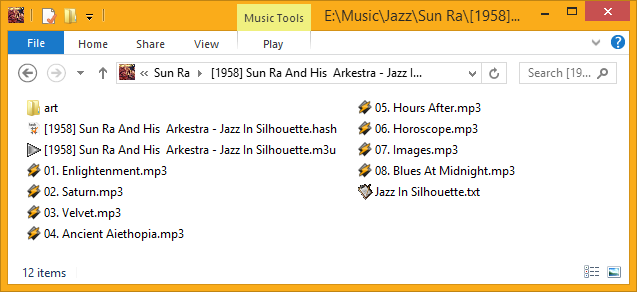
Another killer feature; checksum can create music playlist files along with your checksums! When creating a folder hash, if checksum encounters any of the music files you have specified in your preferences; mp3's, ogg files, wma, whatever; it can create a playlist for the collection (i.e.. the album). Rather nifty, and a perfect addition to the custom command in the tips and tricks section.
As well as regular Windows standard .m3u/m3u8 playlist files (Winamp, etc.), checksum also supports .pls (shoutcast/icecast) playlists.
Effortlessly handles all known** legacy md5 files..
If you discover an MD5sum that checksum doesn't support, Send Me That FILE!
Create lowercase or UPPERCASE checksums at will..
Like many things, this can also be set permanently, if you so wish.
Automatic synchronization of old and new files..
Automatically add new hashes to existing checksum files.
That's right! Automatically add new hashes to existing checksum files!
Integrated Windows® Explorer context (right-click) operation..
The installer will setup Windows® Explorer context commands for all files and folders, so you can right-click anything and create or verify checksums at will. Very handy. "setup", the rather clever installer, is also available in its own right, as a free, and 100% ini-driven installer engine for your own goodies. Stuffed with features, easy to use, and definitely deserving a page to itself. Soon.
As explained above, you can also bypass the installer altogether, and simply unzip-and-go, for 100% portable checksumming. Or you can have both.
Scheduler Wizard..
One of checksum's special startup tasks is a Scheduler Wizard, which will guide you simply through the process of creating a checksum scheduled command in Windows Task Scheduler.
Click a few buttons, set your preferences in the familiar one-shot options dialog, and go!
No-fuss intelligent checksum verification..
Cut and paste your own checksum files if you like, rename them, mix and match legacy MD5 formats in a single file, even throw in a few SHA1 or BLAKE2 hashes just for fun; worry not; checksum will work it out!
Permanently ignore any file types..
Obviously we don't want checksums files of checksum files, for starters, but if you have other file types you'd like on a permanent ignore, desktop.ini files, thumbs.db, whatever; it's easy to setup. The most common annoying file types already are.
Ignored folders..
As well as a set of permanently ignored folders (like "System Volume Information", $RECYCLER, and so on) you can set custom ignore masks on a per-job basis, using standard Windows file masks, e.g. "foo*" or "?bar".
Real-time tool-tip style dynamic progress update..
Drag it around the screen - it snaps to the edges, and stays there (checksum also remembers its dialog screen positions, for intuitive, fast operation).
Tool-tip progress can be disabled altogether, if you wish.
Right-click the Tooltip for extra options.
During verification, any failures can be seen real-time in a system tray tool-tip, hover your mouse over the tray icon for details. checksum also flashes the progress tooltip red momentarily, and (optionally) beeps your PC speaker, to let you know of any hash failures. If there were errors, the final tooltip is red (by default). Anything to make life a bit easier.
Verify a mix of multiple (and nested) MD5, SHA1 and BLAKE2 checksum files with a single command..
Does what it says on the can!
Extensionless checksum files..
Traditionally, individual checksum files are named filename.ext.md5. Personally, I find this inelegant, and prefer them to be named filename.md5. I like it so much, I made it the default, but you can change that, if you like. When running extensionless; if checksum encounters multiple files with same name, it simply adds them to the same checksum file, so checksums for foo.txt, foo.htm, and foo.jpg would all go inside foo.md5, or better yet, foo.hash. Highly groovy.
On the verify side of things, checksum has always verified every possible checksum it can find, so these multi-hash file look just like regular folder hash files, and verify perfectly, so long as the data hasn't changed, of course!
Search & Verify Single Files..
With checksum, you can verify a single file, anywhere in your system, from anywhere in your system, regardless of where its associated .hash file is in the file tree, be it in a folder or root (aggregate) hash.
checksum will search up the tree, first looking for matching individual .hash files, and then folder hashes, all the way up to the root of the volume until it finds one containing a hash for your file, at which point it will verify that one hash and return the result. Another fantastic time-saver!
This works best as an explorer context menu command (supplied).
Smart checksum file naming, with dynamic @tokens..
checksum file names reflect the actual files or folders checked! Automatically.
If you want more, you can specify either static or dynamic checksum file names, with a wide range of automagically transforming tokens. See below for details.
Report Changed/Corrupt/Missing States..
checksum can optionally store a file's modification date and time along with the checksums, like so..
#md5#info.nfo#2009.09.26@19.49:36

			5deee1f6ac75961d2f5b3cfc01bdb39c *info.nfo
Thanks to the extra information, during verification checksum will report files with mismatched hashes as either "CHANGED" (they have been modified by some user/process) or "CORRUPT", where the modification time stamp is unchanged.
These will show as a different color in your HTML logs.
You can choose whether or not to report (and log) missing, changed, or corrupted files. For example, if you only want to know about CORRUPT files, but don't care about changed or missing files, you would set..
report_missing=false

			report_changed=false

			report_corrupt=true
As one commenter (below) pointed out, with this sort of functionality, checksum would become "the only tool against silent data corruption". I believe this goal has now been achieved.
The chosen algorithm is also stored along with this information, for possible future use (aye, more algorithms!).
Automatically remove hashes for missing files..
Stuff gets deleted, on purpose; fact of computing life. When verifying your hashes, you can have checksum remove those entries from your .hash file automatically, so you never have to think about them again!
The number of deleted hashes, if any, is posted in your final notification.
Automatically update hashes for changed files..
Files gets mindfully altered; another fact of computing life - MP3's get new ID3 tags, documents get edited, and so on. Now you can have your hashes updated, too! That's right! During verification, you can instruct checksum to automatically update (aka. "refresh") those entries (and their associated timestamps) inside your .hash file. No more editing required!
The number of updated hashes, if any, is also posted in your final notification.
Effortless hashing of read-only volumes..
checksum can create BLAKE2, SHA1 and MD5 hashes for the read-only volume, but store the checksum files elsewhere; either with relative paths inside; so you can later copy the checksum file into other copies of the volume, or absolute paths; so you can keep tabs on the originals from anywhere.
checksum currently has three different read-only fall-back strategies to choose from; use whichever most suits your needs.
Extensive logging capabilities, with intelligent log handling and dynamic log naming..
checksum always gives you the option to log failures. But you can log everything if you prefer. hashing times can be included in the logs, and proper CSS classes ensure you can tell what's-what at a glance.
Relative or absolute log file path locations can be configured in your preferences, as can the checksum log name itself; with dynamic date and time, as well as dynamic location and status tokens, so you can customize the output naming format to your exact requirements.
In other words, as well leaving it to checksum to work out automatically, or typing a regular name into your prefs, such as "checksum.log", you can use cool @tokens to insert the current..
@sec... seconds value. from 00 to 59
@min... minutes value. from 00 to 59
@hour... hours value, in 24-hour format. from 00 to 23
@mday... numeric day of month. from 01 to 31
@mon... numeric month. from 01 to 12
@year... four-digit year
@wday... numeric day of week. from 1 to 7 which corresponds to Sunday through Saturday.
@yday... numeric day of year. from 1 to 366 (or 365 if not a leap year)
There is also a special token:
@itemwhich is transformed into the name of the file or folder being checked, and@status, which automatically transforms into the current success/failure status.
You can mix these up with regular strings, like so..
log_name=[@year-@mon-@mday @ @hour.@min.@sec] checksums for @item [@status!].log
The @status strings can also be individually configured in your prefs, if you wish. Roll the whole thing up, and with the settings above, the final log name might look like..
[2007-11-11 @ 16.43.50] checksums for golden boy [100% AOK!].log
HTML logging with log append and auto log-rotation..
As well as good old plain text, checksum can output logs in lovely XHTML, with CSS used for all style and positional elements. With the ability to append new logs to old, and auto-transforming tokens, you setup automatic daily/monthly/whatever log rotation by doing no more than choosing the correct name. You can even have your logs organized by section and date, all automatically; via the free-energy from your @tokens.
Click here to see a sample of checksum's log output, amongst other things.
Exit Command..
checksum can be instructed to run a program upon job completion. It can also pass its own exit code to the program.
Total cross-platform and legacy md5 file format support..
Work with hidden checksums..
If you don't like to see those .hash files, no problem; checksum can create and verify hidden checksum files as easily as visible ones. Like most options, as well as on-the-fly configuration via the options dialog (hold down SHIFT when you launch checksum), you can set this permanently by altering checksum.ini.
To create hidden checksums (same as attrib +h), use "h" on the command-line, or choose that option from the options dialog.
Don't worry about creating music playlists with the invisible option enabled, the playlists will be perfectly visible, only the checksums get hidden! (well, someone asked! ;o)
"Quiet" operation..
Handy if you are making scheduled items, etc, and want to disable all dialogs and notifications. Simply add a 'q' (or check the box in the one-shot options).
You can also set checksum to only pop up dialogs for "long operations". Just how long constitutes a long operation, is of course, up to you. The default is 0, so you get "SUCCESS!", even if it only took a millisecond. Check your preferences for many more wee tricks like this.
"No-Lock" file reading..
checksum doesn't care is a file is in-use, it will hash it anyway! And it won't lock your files up while it's doing it. Feel free to point checksum at any folder.
Audio alerts..
Unrelated to the "quiet" option (above), checksum can thoughtfully invoke your PC speaker to notify you of any verification failures as they happen, as well as shorter double-pips on completion (if your PC supports this - many modern PCs don't). You can even specify the exact KHz value for the beeps, whatever suits you best.
You can also assign WAV files for the success and failure sounds, if you prefer. A few samples can be found here.
Drag-and-drop files, folders and drives onto checksum..
If you prefer to drag and drop things, you can keep checksum (or a shortcut to it) handy on your desktop/toolbars/SendTo menu, and drag files or folders onto it for instant checksum creation. This works for verification, too; if you drag a hash file onto checksum, its hashes are instantly verified.
Note: like regular menu activation, you can use the SHIFT key to pop-up the options dialog at launch-time. You can also drag and drop files and folders onto the one-shot options dialogs, to have their paths automatically inserted for you.
User preferences are stored in a plain text Windows® ini file..
You can look at it, edit it, back it up, script with it, and handle it. Lots of things can be tweaked and set from here, though 99.36% of people will probably find the defaults are just fine, and the one-shot option dialogs handle everything else they could ever need. But if you are a more advanced user, with special requirements, chances are checksum has a setting just for you. Click here to find out more about checksum.ini
Comprehensive set of command-line switches..
Normally with checksum, you simply click-and-go; but checksum also accepts a large number of command-line switches. If you are creating a custom front-end, modifying your explorer context menu commands, or creating a custom scheduled task or batch file, take a look at checksum's many switches. For lots more details, see here.
If you simply have some special task to perform, it can probably be achieved via the one-shot options dialog.
Shutdown when done..
If your system doesn't normally run 24/7, don't let that stop you from hashing Terabytes of data! checksum can be instructed to shutdown your PC at the end of the job.
That's a lot of features! And it's not even them all!
checksum is jam-packed with thoughtful little touches, you might even call it Artificial Intelligence! Wherever possible, if checksum can anticipate and interpret users, it will.
Legacy and cross-platform MD5/SHA1 file formats that checksum can handle..
If you look inside any MD5/SHA1 checksum file - it's plain text - you find all sorts of things.
Here's what a regular (MD5) checksum file looks like..
01805fe7528f0d98c
Each line begins with the MD5/SHA1 digest (hash), followed by a space, then an asterisk, then the filename. It's a clear format, flexible, relatively fool-proof ("*" is not allowed on any file system), and well supported.
Other formats I've come across..
single file single MD5/SHA1 hash types - these necessarily have the same name as the file, with ".md5" or ".sha1" extension added, and are often hand-made by system admins, or else piped from a shell md5/sha command) ..
01805fe7528f0d98c
4988ae20125db8071
space delimited hashes (before we figured out the clever asterisk)..
01805fe7528f0d98c
4988ae20125db8071
double-space delimited hashes (just silly, really)..
Believe it or not, this is the de-facto standard for md5 files, mainly because it's the output from the UNIX md5sum/sha1sum command in 'text' mode, which amazingly; is the default setting. By the way; md5sum's "-b" or "--binary" switch overrides this insanity.
01805fe7528f0d98c
4988ae20125db8071
TAB delimited hashes (I am assured these do exist!)..
01805fe7528f0d98c
4988ae20125db8071
back-to-front hashes in parenthesis - this is quite a common format around the UNIX/Solaris archives of the world (it's the output from openssl dgst command) ..
MD5(01 - Stygian Vista (radio controlled).mp3)= 01805fe7528f0d98c
or..
MD5 (01 - Stygian Vista (radio controlled).mp3) = 01805fe7528f0d98c
even..
SHA1(01 - Stygian Vista (radio controlled).mp3)= 4988ae20125db8071
checksum supports verification of all these formats with ease, so feel free to point it at any old folder structure, Linux CD, whatever, or any .md5 or .sha1 files you have lying around, and get results.
And in case the above track names got you googled here, yes, checksum also works great in Microsoft® Vista, and Windows 7, Windows 8, Windows 8.1, Windows 10 and Windows Server of course, even XP! ;o)
simple checksum
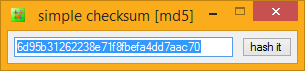
Supplied along with checksum is checksum's little brother app, "simple checksum", a supremely simple, handy, free, and highly cute drag-and-drop desktop checksumming tool utilizing checksum's ultra-fast hashing library; for all those "wee" hashing tasks..
Drop a file onto simple checksum, get an instant MD5, SHA1 or BLAKE2 hash readout.
Drop two files, and get an instant MD5, SHA1 or BLAKE2 file compare.
Drop two folders, and get a hash-perfect folder compare (using checksum as the back-end).
Drop a file onto simple checksum with a hash in your clipboard, get an instant clipboard hash compare.
And that works from your "SendTo" menu, too (select two files - SendTo simple checksum.. instant file compare; send two folder, get a hash-perfect folder compare), as well as drag and drop onto simple checksum itself, or a shortcut to simple checksum.
Packed with intuitive HotKeys and time-saving automatic settings, simple checksum is Handy Indeed!
And simple checksum is COMPLETELY FREE, as in beer. Check it out..

download
Download and use checksum, for free..
click to see zip archive contents
# made with checksum.. point-and-click hashing for windows (64-bit edition). # from corz.org.. http://corz.org/windows/software/checksum/ # #md5#checksum.zip#2015.07.04@01.26:25 024f061d2262d95d0864fa558fd938f9 *checksum.zip #sha1#checksum.zip#2015.07.04@01.26:25 199ef31f91c06786a05eeead114c026a67426488 *checksum.zip
click to see zip archive contents
# made with checksum.. point-and-click hashing for windows (64-bit edition). # from corz.org.. http://corz.org/windows/software/checksum/ # #md5#checksum_x64.zip#2015.07.04@01.26:28 72e1cac7bd2dfd4ce3cf862920350bfa *checksum_x64.zip #sha1#checksum_x64.zip#2015.07.04@01.26:28 86d8db98f96b5c8e196594667b9d324e066f4215 *checksum_x64.zip

NOTE: If your Anti-Virus software detects anything in this software, I recommend you switch to an Anti-Virus that isn't brain-dead. If you DO discover an actual virus, malware, trojan, or anything of that nature inside this software, please mail me, and I will send you a cheque for a Million Pounds, as a reward. In other words, this software is clean.
These guys agree..
(note: I've now removed checksum from most of these sites!)


(Ahh.. The beauty of PAD Files!)
License Upgrade
If you need to upgrade your ancient license to the new format (checksum v1.3+) go here.Itstory..
aka. 'version info', aka. 'changes'..
This is usually bang-up-to-date, and will keep you informed if you are messing around with the latest beta, and let you know what's coming up next. Note: it was getting a bit long to include here in the main page, so now there's a link to the original document, instead..
You can get the latest version.nfo in a pop-up windoid, here, or via a regular link at the top of this page.
Leave a comment about checksum..
If you think you have found a bug, click here. If you want to suggest a feature, click here. For anything else, feel free to leave a comment below..
Cor, great program! I appreciate that you've got it working with the Windows7 menus. For a quick check of the a single file in different folders, it would be nice if there were an option to leave a dialog open with the checksum.
Multiple Instances?
Cor, I'm looking at using checksum to beef up my unraid server. Right now I'm generating hashes for multiple disks each containing several terabytes of data.
While checksum is busy hashing a disk it looks like I cannot ask it to do an immediate single file hash. Instead it seems to queue the request until it gets done with its current server task.
Is there any way to run multiple checksum instances simultaneously?
Thanks for an excellent utility!
paul
WOW Cor! that's the most responsive support reply ever. Thank's a million!! - paul
Corz -- First off - REALLY good app!! I've been using it for about 2 weeks, and I'm really impressed! I tried about a dozen checksum apps before finding yours, and none of them even come close.
I have a massive mp3 collection, and I am trying to develop a solid routine to check for corrupted files, both in my main storage location and also on two backup drives. First, I create regular checksums for a folder (which could have 10 - 200 subfolders my albums), then I create a one-file root checksum and synchronize it with the existing checksums, so I can view the log showing all files, in addition to each individual album in the root folder. So far, so good.
But where I am having trouble is when I replace an album with a higher quality rip -- I rename the original folder (for example: album-old) then add the replacement folder, giving it the same name as the original, lower quality album. I delete the orinal hash file from the older album and create a new hash, and create a hash for the new folder. When I go to verify the root folder, checksum reads the one-file root checksum and tells me that the files have changed. I tried choosing create checksum, holding down the shift key, selecting "one-file root checksum", then clicking on "synchronize" when checksum finds the original, but it doesn't update the existing root hash file. The only way I have found to get the one-file root checksum hash to verify is to delete it and create a new one. This takes forever for root folders with 150 or so albums.
Is there a better way to do this? Basically, I just want to be able to verify that my backups have the same files as my main library, and it seems like using the one-file root checksum hash is the best/only way to do this. Any advice?
Okay, note: updating and deleting hashes happens only during a verify operation. So all you need to do is verify your root hash with the update option enabled* and it will happen automatically.
;o)
* hold down the <SHIFT> key at launch to bring up the one-shot options, or else add a w to your command-line. You might also want to enable the delete missing hashes option (command-line: x).
<<Thank you for your kind words.
Okay, note: updating and deleting hashes happens only during a verify operation. So all you need to do is verify your root hash with the update option enabled* and it will happen automatically.
;o)
>>
Thanks for the quick reply, Cor!
I knew I must have been missing something.... Been playing around with this and I'm able to do everything I need to now. Your software is a pleasure to use!
Yo, I like the way you think. And you listen to Sun Ra, too. I Love it. Keep up the good work.
Hi Cor-
Your software is a pleasure to use. I've been using it for years.
Many thanks for making it available to us commonfolk - it wouldn't be accessible to me were it not for your generosity in providing your work with an opensource license. I truly appreciate it.
Listened to your music - good on you for putting your thoughts to paper. It's rare to find someone committed enough to actually make their thoughts materialize ...it's easier to say 'I would if I had time...and it would be GOOD!'. My SON is a drummer. He, like you, can hear music in his head which needs to get out, and he can hear the imaginary instruments in the background even before he composes the parts.
Thanks - appreciate your hard work.
I hope that you're okay ...noticed you can't reply. Best wishes if you are struggling with a personal health issue or other difficulty.
-str8arrow
;o)
Hi corz
I have a question regarding "synchronize" functionality. How does it actually help in the speed department in terms of generating a hash file? I stopped at some point hash generation, then went back to it the next day, however I still saw on the popup same files being processed, and some larger files (which already been processed the day earlier) being up there for big portion of the time (which would seem those files were not skipped at all).
Maybe I am mistaken and I overlooked things, but I would appreciate if you could explain how the synchronize option exactly works in a little bit more detail than what there is in the ini file.
sincerely
Lucas
If you added a single file to a volume which had already been hashed, and re-hashed the volume; assuming there are no other changes; only one file (the new one) would get hashed.
If you look inside the .hash file (in a plain text editor) you will see the newest hashes at the end.
;o)
Hello,
I'm testing out checksum to see if it will work for my purpose. I'd like a way to automatically verify files periodically and notify me of silent corruption.
I saw that checksum can be run from the commandline. I ran it with the v switch and noticed that the commandline launched the UI asynchronously and returned immediately, therefore not giving me any output on the commandline. Once the verify was done, the result dialog popped up reporting no errors, etc. I thought maybe if I ran it in quiet mode (q switch), it would present something on the commandline, so I tried that too. That did remove the result dialog, but still nothing on the commandline. I tried redirecting (> output.txt) on the commandline and that didn't provide any text either.
Is there any way to get a "success" or "failure" as output on the commandline from checksum? If not, I'll look into the possibility of a more complicated orchestration of logging the output to the html/text file, parsing that, and notifying me of verification failures.
Thanks,
David
@echo off
start /wait C:\PROGRA~1\corz\checksum\checksum.exe vq-t "B:\Test\checksum\1000
small files"
:: -2 is checksum's exit code if there were verification errors.
if %ERRORLEVEL% equ -2 goto ErrorRoutine
:: 100% OK
exit
You can get a list of all the exit codes here.
;o)
Not a happy camper here!!
Trial version does not offer the ability to check directories - only individual files. I need to check entire directories for multiple files so I purchased the product in order to have this capability.
I have received no order confirmation and I am now expected to wait days to receive the unlock code for the product!!!
This is 2015 where email confirmation and receiving product registration keys instantaneously is common practice.
This is VERY disturbing!!! I needed the application today!
Ridiculous!
Note; the "trial" version is identical in function to the "full" version. There is a splash windoid at the start, and some cosmetics can't be customised; about box or preamble comment in .hash files. Either version will do what you need. It's the default behaviour!
checksum always hashes (or verifies) all the files in all the directories, digging into the entire tree, unless instructed otherwise. Perhaps you expected all the hashes to be in a single file in the root directory, but they are in each and every directory. Check for that. checksum can easily create root .hash files (with hashes for the entire tree in a single .hash file) by passing the "1" switch (no quotes) on the command-line, or by choosing that option in your one-shot options. (hold down shift key on checksum launch to get to the options)
Registraton: if you bought a license, thank you! Your registration code was sent immediately on verfied payment, to the email address used to make the payment - the system has been working well for a few years now. In almost all cases of "missing" registrations so far, a spam folder somewhere in the email chain was the culprit. Check there if you can. If not, send me details from a more accessible email address and I'll resend your registration with pleasure.
Function is identical, but there's instant startup and those other minor differences, most suitable for corporate enviromnemnts or those who like the warm fuzzy glow of paid-for, independant software.
;o)
kbucher - I'm not sure what the trial version is, but I downloaded the version here: https://corz.org/engine?section=windows&download=checksum_x64.zip
That one allows for "one file 'root' checksum" and "recurse" options, that will create one checksum file for all files, at all child levels, inside a folder. That would seem to give you what you are seeking.
David
Indeed kbucher, it's all there, and much more (the "trial" version is fully functional).
The documentation online here is also a goldmine of useful usage data.
Anything you think I've missed, or new features you want documented first, let me know here or on the feature request comments on tricks and tips page, or by email.
;o)
I love your software! I started using it in 2011 to monitor the heath of files in my collection. Funny story, in retrospect anyway: I had it working great for a month, then it got really slow. Seemed like the whole stream got hung. I had it running quiet on an unattended machine from an "AT" scheduled job. A few times I picked it up trying to figure it out. Last weekend I discovered it took exactly 10 minutes per folder. When I ran it buy hand I saw the "Register Me" popup. I wasn't aware of the effect of the trial expiring so the project laid dormant until last weekend.
I have one request: The ability to specify the log folder from the command line. I know it's configurable from the INI but I would like to keep the logs in their own folder per project. Not global to the machine and not in with the files I'm monitoring. If the command line switch is not present fall-back to the INI value.
This might cause you a problem with your queuing mechanism. I don't use queuing if that helps.
BTW, how can I clear the queue? While experimenting with options in an automated BAT file I got thousands of jobs queued. I had to walk away for the day when I couldn't figure out how to clear it.
I look forward to experimenting with new found features like playlist creation.
I'm glad you are still in business and that I can resume my project. Years ago it was a pain finding a program to handle checksumming like I wanted it. Then when I ran into the unknown trial issue I searched for a replacement several times to no avail.
I will look into making the logging location configurable on the command-line. In the meantime, consider running checksum in portable mode, where the logs go in the program folder. You could also run multiple portable copies, each with individual settings.
;o)
ps. playlist creation has been around since almost the beginning! But there are LOADS of other new features for you to play with!