itstory..
evolution and stuff..
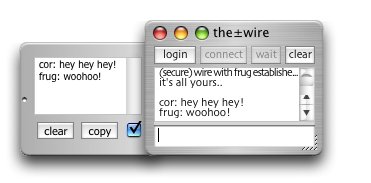
0.9
• Automatic Logging: We have this now, yes! Logs can be created automatically in a folder of your choosing. the±wire will append chat to whatever log, depending on which scheme you have chosen; log by connexion (creates lots of logs), log by day, by week, by month, or finally, log by buddy (the default).
You can use the check on the log box to toggle the actual logging process, or if you don't enabled autologging, that control can be used it to create individual logs as before.
° Fixed a few wee bugs in the prefs window, stuff I hadn't cleaned up when I moved some internal prefs for the last version. Well, I never switch off the tips!
• Still on the prefs; I needed to be able to add new keys to the preference file with future application upgrades; as things were, this was difficult; I'd created empty keys for every feature I planned to add, but now I realise that not only did I not think of everything, but that I still might not have thought of everything, and this fixed-preference file is a Very Bad Idea, both limited, and limiting.
I reworked the prefs handling, giving me a mechanism to upgrade features and their related preferences seamlessly, well, almost. From now on, if the±wire finds a default preference file next to itself (or next to the binary in OS X packages), it will use it. Once it has used this to create your preferences, the default will be renamed to wiredefault.plist.bak. Your old prefs are backed up too, just in case you there's something in there you need to retrieve, that secret port number perhaps.
You can delete these .bak files if you wish. Though if anything were to happen to your real preference files, the±wire could use these to recreate a new set.
The downside is that when you upgrade to this new version, your preferences will be reset, things like retry rate, help tips and so on, but in balance, it's a worthy trade-off for the extra features. The old method sucked. Your buddies remain untouched. Although they share the same new mechanism, if you already have a buddyfile, it will always be used and the new default buddylist ignored, renamed to wirebuddies.plist.bak
Once we get to final release, this sort of thing wont happen any more, probably.
° fixed the extra spaces in the log files. they are tab-deliminated, by the way; you can import that easily into other applications, databases, whatever.
° fixed the extra linefeeds in the log box too, that was a weirdo.
° fixed a bug in the autocopy™, where the nick part was getting copied too. oops. sorree!
• Removed the limitation with the tips. previously, if you disabled the help tips, you would need to restart to get back any tips that you had hovered the mouse over since disabling them. No more; now you can toggle them on and off as required (apple/ctrl-T, also available from the help menu). No tips are "lost". I've got this working on all platforms now, I think.
Apparently, "Classic" Mac OS balloon help truncates the display of some of the tips, you guys will have to either a) wait for me to do a "how-to" page with all this info and more on it, or b) get a real operating system. I recommend the latter.
° fixed a bug on the windoze builds where if you drag-and-drop multiple lines of text from another application (say TextPad) or from the±wire itself, only the first line got displayed. The others were there, just not displayed.
° fixed those sounds so that they don't play if you have sounds disabled - well, I wanted you to hear them!
• moved the PING response over to log box (the log box will scroll to show you the result, regardless of the scroll setting, unless you have messages switched off, of course) Also, there's now an audio alert for a successful ping (when it cames back). If you disable both messages and sounds, you'll never know if a ping was successful! - remember you can use "/ping" in the main chat.
• fixed the time settings, pings, and other stuff will now have the correct time, as opposed to the application launch time. oops.
• added audio confirmation when deleting items from the drag-n-send™ window (backspace on mac, delete key on other platforms) - creating interesting sounds is one of my favourite coffee-break activities. WARNING: this sound is highly addictive, I can't be held responsible if you delete your whole hard drive just to hear ot over and over.
• some minor enhancements to the nick changing - remember you can do "/nick whatever", just like IRC, as well as use the login window for changing your nick)
• cursor in drag-n-send™ window will now change to "hand" (Mac Carbon) or "centre" (other OS) to reflect what action will be performed when you click on an image too big to fit in the window.
• you can now set the jump value (the number of files you "jump" if you do pageup or pagedown) in the drag-n-send™ window itself. The editfield itself does simple, clever things, take note.
• the filesize of non-image files is now displayed in the drag-n-send™ window, in quasi-human terms.
• receiver now gets a file transfer progress box too, and thence, the ability to cancel any file transfer in progress, if they so wish. note: if either end cancels the file transfer, the "part" at the receiver's end is deleted immediately (if possible) and the drag-n-send™ window reverts to its previous state, either browsing some folder, or closed.
• There's now a confirmation dialog for new file transfers, before the transfer begins, you will be asked whether you wish to accept files from this human. If you click "yes", that buddy can transfer files to you for the rest of the session without further dialogs.
If they are also in your buddylist, the "yes" will be remembered permenantly (or until you delete/resave their buddylist entry/hack your plist file), i.e. that buddy is now cleared for sending you files. (another good reason to use their usual nickname as the entry name) Similar story for "no".
• brought back the remote address notification. When you connect, the±wire now reports "wire with so-and-so (192.168.0.1) established", or whatever. Useful in verifying you are chatting with who you think you are chatting with.
• When you recall a buddy, any custom port settings you had will now be honoured. If you need to specify a custom port for a particular buddy, remember to set that (in the prefs) before you save them to your buddylist.
• added a couple of interesting twists to my homebrew encryption scheme. beta testers, please ensure the person you want to chat to is also using version 0.9, or else secure chat will be complete gobbledygook! For you amateur cryptanalysis out there; here's that same phrase I used earlier, but with the new encryption scheme..
≈Ω∆Å∆åƒ∏∆Ñ∆ë≈Å∆ò∆è∆è≈ç∆§ ∆ú∆£∆û≈ú∆•∆±∆∑≈®∆¨∆∫∆Ω≈ ¥∆æ«â«å«Ñ∆É«ì«é«ö∆ 諶«§∆ò «û«≠«Æ« ©∆߫櫺∆∞»á«æ «æ∆º»Ä»ã»â «à»ö»î«ë»®»ü»ü« ù»∞»§»∏»Ω…Ö
interesting, huh? (I added the spaces just now)
• nick data and suchlike now always travels encrypted as well, though with a weaker algorhythm than the secure chat, as the keys must be known in advance, i.e. fixed.
0.8.5
I'm feeling more confident about this whole Unicode business now, in fact, I think I actually understand what it's all about. Like most folks, especially software developers, I was kinda hoping the whole thing would just go away. It wont.
Here's something crazy; Windows uses UCS2 as its standard string type, for the OS (XP/2K/2003/etc) and Visual Basic, COM, etc; nothing wrong with that, UCS2 is a useful encoding; yet RealBasic, which compiles, and always has compiled applications for Windows, has no UCS2 support! Supports just about every other text encoding on the planet, but no UCS2. The word "brain-dead" comes to mind. Until that happens, windows users can expect oddness with extended characters in the±wire. sorry-o.
• I further extended the abilities of the log box. You can now drop text clippings (clipping files or dragged text from other apps) directly into the log box. If there are multiple lines in the clipping, it will display them all, just like it does when you drop regular text files on it. All the log box functions work when you are offline.
• after much soul searching, I have finally decided to add this capability to the main chat window. If you drop a clipping with multiple lines, they will all be displayed, and sent straight down the±wire. You've been warned. Enough folks asked me about this for me to seriously consider it.
the±wire tries to be clever about the text you drop, code should remain well formed, etc, making it easy enough for someone at the other end to retrieve bits easily enough. I'd still recommend sending bigger text files with drag-n-send™ The chat window is really just for chat (which is why the input box has a set limit)
A sad day; I removed the cute "try here" when you drop files into the chat. Now the±wire just loads them up in the dns window, saving you dragging them twice. Makes sense, sure, but the dns window popping up and saying "try here" always gave me a wee thrill. I might do a pref, heheh.
note: if you drop text files directly into the chat, they will be displayed in the log box. if you want to send them over the±wire instead, drop them directly into the drag-n-send™ window. (apple/ctrl-d)
• I added font and fontsize menus to the log box, you don't need to hack the plist to alter those now. There's a small time penalty at startup, I guess, as it populates these menus, miliseconds.
° Fixed a bug where if you received a file and had the "dns stays put" setting enabled, there was no "parent" folder for the file, and moving left/right/etc would crash the±wire.
° Fixed the bug in windoze builds where the±wire wouldn't enter an autowait state if you had the log box showing.
• Finally got the windoze builds to accept dragged files. Now you billy-goats can drag and drop most filetypes onto the drag-n-send™ window, even the main chat window. You can also drop text files into the chat/log box windows to be displayed, and even drag text from other apps. have fun!
° Fixed some of the weirdness on the windoze log box. It shouldn't wobble about now, much. It still wont go where it was put, though.
° Fixed the executable files rejection. Everything gets reset properly now. note: you can still send excecutables, but both parties must hack their plists to do it. This is to prevent possible vulnerabilities on the windoze platform
• Added the facility to store your "wirefiles" in a different folder (a.k.a custom location). You might not want that on the desktop.
0.8.3
Magical days.. not getting a lot of coding in, though. Had three wee sessions since we last spoke.
° Fixed a couple of minor bugs in the directory handling of the drag-n-send™ window. As well as the usual evil .DS_Store files, the±wire is now savvy about other invisibles, and will ignore them entirely. A directory containing nothing but such files is considered empty.
• dns window titling is now more consistent, regardless of the filetype you are currently viewing.
• I started on coverting all the internal strings to UTF8, I'm committed to getting on top of this. Truth is, I don't really understand this whole text encoding business, and I suspect, neither do you.
It occurs to me that many parts of the development process are invisible to users, most of them, in fact. How could you know the heartache and frustration involved in getting, say, an encryption scheme or communication protocol unicode savvy; a bag of bugs emptied slowly. It's a take for-granted, only when it's broken do folks notice, send emails.
• well, for fun, I added counters for zener scores with particular buddies; if you save the buddy's name as the entry name in your buddlist, zener will update that counter whenever you are challenged by that buddy. If they use a different nick during a challenge, it wont update the tally. This feature will polarise opinions. hahah
I've discovered a(nother) bug in the RB's implementation of metal windows. The workaround I used for the metal window drawing problems also fixes this.. LEAVE THE LOG BOX OPEN! I've added a warning message along these lines for when a carbon version user attempts to close the log box. hopefully the boys at realsoftware get this nailed soon *sigh*. It's been there all along, I just never put my window off the bottom edge before.
• Added a shortcut for secure chat (apple/ctrl-e) (think "encryption") you'll find this handy if you're the kind of person who gets a kick out of repeatedly switching on and off the ship's cloaking device.
• the±wire will now display its own logs if they are double-clicked/dropped onto dock/explorer icon, etc. Previously it just ignored them. It will send other (non-text) files to the dns window. On OS X, you can force any application to accept any dropped file by holding down apple-option as you drop the file onto the application's dock icon. This way, you can drag any file into the±wire, have it launch and jump straight to that file in the dns window. This works on windoze too, just drop any old file onto the±wire's icon/shortcut, which kinda makes up for the lousy drag-support in windows generally.
• Log Box: If you desperately want to change the font/fontsize of the log box, you can hack the values into the plist file. there's no pref for it, but I might do that yet. If you hack something invalid, the±wire will use its defaults.
• You can also hack the "jump" value, that is, how many files a pageup/pagedown will jump. The default is 10 files. Put in whatever you like.
• Another thing you can hack is the text files definition. Add any extensions you'd like to be displayed in the log box. Did you know you can drag text files straight into your log box and they will be displayed there? well, you can, and they will. Other filetypes get redirected to your drag-n-send™ window, and if they are images, displayed. Note: files actioned this way will NOT be automatically sent down the±wire via the drag-n-send™ mechanism, even if that is enabled. This is by design. Only files dropped directly into the drag-n-send™ window itself are eligible for this special treatment. It also prevents you from accidentally sending files to unwitting recipients simply by double-clicking them, or dropping them on the wrong dock icon, or whatever.
my body needs to get some sleep, it's been a long session, but with nice unicode handling throughout (at least on Mac OS X, fingers crossed for the rest), and a slew of improvements, features and fixes, I'm proud to announce we are at, erm 0.8.3
0.8
Fixed the few minor bugs, including the sticky login window problem on windoze.
Finally removed the "log to file" checkbox from the main window.
drag-n-send™ window: added a pop-up menu of all the files in the current folder, so you can select any file directly. There's a small time penalty, but well worth it I feel. It's still pretty darn swift, even with LARGE folders.
To give you an idea, on my 333MHz iMac running OS X Panther, the±wire will index a folder of 1359 images (my "wonky pix" folder, on a remote volume on my network), build the pop-up, and display the first image in just over three seconds! Don't expect to chat while this is happening!
note: you can use the pageup/pagedown keys to move very quickly through the pop-up menu of very large folders.
I added a preference to tell the dns window to stay put, that is; in the folder you are browsing. In other words, it WILL NOT jump to your "wirefiles" folder on receiving a new file. It will display the new file/image as usual, but moving left/right/up/down continues from exactly where you were.
Also added a few other hot-keys to the dns window:
| delete | moves current file to
trash (no warnings, cuz it's in yer trash) |
| backspace | same as above, but for mac users. (on other platforms, backspace takes you LEFT) |
| home | takes you to the first file in the current folder |
| end | takes you to the last
file in the current folder (any Mac keyboards have this?) |
| u | update the folder. useful if you have added items to a folder and want the±wire to index it again. If you were at file no. 3, you will remain at file no. 3, regardless of whether or not file no.3 is still the same file after the update. note: this happens automatically on new files dropped/received |
| L | toggles the "lock size" control, which prevents the window size from altering. |
This is in addition to the current commands:
| left arrow/keypad-4 | previous file |
| right arrow/keypad-6 | next file |
| down arrow/keypad-2 | takes
you into a folder (or RIGHT, if it's not a folder) |
| up arrow/keypad-8 | takes you up to the parent folder |
| PageUP | back 10 files |
| PageDOWN | forward 10 files |
| spacebar | wire it! |
| o | open/launch file |
| apple/ctrl - d | drag-n-send™
toggle the drag-n-send™ functionality, which automatically wires every file you drop |
Still doing my rounds through the code, hoovering and dusting. which reminds me, I think I've got someone coming to stay any day now, I'd better do the same to my apartment sometime soon. I knew sacking the cleaner was a mistake! hahah
(fc1)">
0.7.5 (fc1)
Yup! We're at final candidate stage now. W00H00!Secretly, for a long time now, I've been thinking about a "hidden game" for the±wire, something that folks might enjoy over a network, but nothing really came to mind. I thought about tic-tac-toe, about battleships and such. They all sound like suck-city to me, well, maybe tic-tac-toe (or rather, naughts and crosses, as we call it) would be okay. In the bath today, it hit me! A zener game! Of course!
Chat has to be about the best method of "connecting" online, I mean really tuning in with people; so what better way to stretch your psychic mettle than with the time-honoured classic test; zener cards!
One hour later, with soapy water still dripping from my mac keyboard, we got it! Zener Extreme! Hell, the±wire will even keep your scores! AAAAALRIGHTEEEE±!
Strangely, the old "disconnexion at connexion" bug has reappeared. This is weird; almost every part of the protocol has been re-written from scratch. I'll scratch my head a bit, and think metaphysics, I think.
It goes like this. Right at connexion, it cuts off again, and then reconnects quickly, looks like you're connected okay, but you aren't. If the connector tries again manually, it *really* connects, no problem. And all the while, the person at the waiting end is blissfully unaware of the whole episode, they think the connexion went fine; they might even be chatting away. It only happens very occasionally, but still. hmmm..
I think the final candidate thing is a curse.
Maybe scrub that for now, eh.
0.7.4
• I think I've cracked it. that is, intelligent directory handling. the drag-n-send window will now check some things for you, like whether a folder is empty (no point going in if it is), and will (fingers crossed) back up to the correct folder when you go "up" again, and again, and again. pretty cool.I spent an age debugging what turned out to be a silly error on my part; time well spent; what we've ended up with is way smarter and much smaller (code-wise) than the old viewer.
0.7.3.5
i got the "lock size" function to work properly, and update correctly, at last. coded up the copy button so you can send images from the drag-n-sendo window to the clipboard, regardless of whether they are dropped or received.i Finally! I coded up the actual drag-n-sendo button! now you really really can drag-n-send! Just turn that on (drag-n-sendo toggle button), and drop stuff into the drag-n-send window to have it shoot straight across the±wire! even just running it locked as a wee box in the background on your desk. real handy. thanks to good design, this was only one line of code!
i fixed a few more bugs in the file-handling. stuff like deleting cancelled transfers now gets done automatically, and wont crash the±wire in the process.
0.7.3.3
i I realise I have just created the finest image viewer known to man. well, okay, it lacks most of the features of a decent image vewer, no fullscreen, no slideshow, no scaling, whtahaveyou, but, BUT! the navigation system is utterly to-die-for. Why didn't anyone think of this before? With just four llittle keys you can go anywhere, view any image, send any file. It's beautiful. now for all those bugs..In fact, a lot of the time I say I'm fixing bugs, I am in fact "adding features". the rationale here is that I like things to be just-the-way-I-want-them-to-be. And until that point, they are flawed, bugged. Of course I got some real hooters too, and a fair few of those out-of-my-hands-down-in-the-IDE thingies to work around as well, but mostly it's fine-tuning, getting stuff "just so". and lots, and lots of testing.
0.7.3.2
° fixed the zero-length files bug. They will now simply be rejected, along with other evil files and folders (I'll possibly look into wiring whole folders some time in the future)i added more intelligent error reporting for some possible network errors.
i started work on beefing up the "image viewer" capabilities. You can now cycle through a folder of files with the left and right keys, sorta. Images will be displayed along the way.
0.7.3.1
i added autowait%trade; (you love these cute terms I coin, dontcha!) which basically means, you can have the±wire begin waiting for a connexion automatically at launch-time. someone asked for this.i added a few "nice wee touches", among them, the ability to remember your last login details, and enter them for you automatically at launch time. now connexion really is a one-click process!
0.7.3
° fixed loads of bugs in the dns window and the file transfer itself, and some other stuff too. there were a couple of real nasty ones. removed the ability to send a file straight back. I mean, how crazy is that? Of course, if you drag it from your wirefiles folder into the drag-n-send window, you can send it like any other file, if you really must.i added a progress bar for the file transfers, useful for large transfers, though it has a tendency to freak out with very big files (50MB+), giving information like "transfer -37% complete". (that's MINUS!) erm..
i added the facility (for the sender) to cancel a transfer in progress
i chunked the send data (5k chunks), which should make large transfers much more reliable over slow networks. You also get the user interface back now!
i the±wire will now report in the chat window when files are being sent and received, and again when receive is complete. name and size (rounded up to the nearest kb)is also reported.
0.7.2
° too many wee fixes and improvements to mention them all.Got to spend some quality time with the new image transfer window and other stuff, and devised something called something revolutionary... drag-n-sendo technology (TADA!) over a nice cappuccino. It's just a useless checkbox for now, but I think you can see where I'm going with this.
i ahem. I got the dns (drag-n-sendo, you know) window on windoze to behave better, attempting to do what the mac one does naturally. In other words, keep the image in the centre, rather than crop the bottom and right sides off. Don't ask me for rescaling images, it's not even on the cards.
I then thought it would be a cool idea to be able to move the image around by dragging it, for instance, if it is bigger than the window. this wee journey has introduced more bugs and problems than everything else so far; image handling across platforms is vastly different. Works great on OSX though!
i moved the received files folder (this has been annoying me). if it doesn't exist, the±wire will create a folder called "wirefiles" on your desktop. There's no need to ever save the files you receive, everything lands in there automatically. This also makes it uber-easy to trash the whole lot at the end of a session (with killer! heheh).
0.7.1
° Fixed most of the major bugs in the image transfer. the±wire wont crash if you send the same image repeatedly, or send back an image you just received. You can send non-image files too, though currently there's no way to get the windoze version to accept dropped non-images.Without threading, transferring large files over slow networks (particularly if you are short of memory, on a dial-up connexion perhaps) will be frustrating, but I've transferred 100MB+ files over a local network without problems. I'll look into more efficient transfer methods for slow networks. And threading too. When I've got a more logical head on. It's almost a full moon.
Oh, and if you come across some filetype that wont send let me know.
The prefs are all live, by the way. If you make a change, it's updated immediately in the plist file, and only then (well, also at quit). It's a good system, in the event of a crash, the last saved prefs remain. I haven't had a trashed plist yet, and I've crashed the±wire a *lot*. Ah, the joys of debugging...
0.7
• image transfer is GO!!!You can drag an image into the chat (mac only for now) and it will pop up a window with the image in it. Click "send image" and it will be sent -as if by magic- to the other end of the±wire, where it will pop-up an identical window, image and all. I've been doing wee slide-shows for folks on my home LAN! heheh
This works on windoze too, but you have to drop the images directly into the image window itself (I'll add a control to pop that up manually). You can do it this way on a mac too, of course.
My plan was to support "wee files of any kind"
The code is pretty loose and shaky at the moment, but I just tried to transfer "calc32.exe" from my mac (in fact I was grabbing it from a peecee via samba! but it was on my mac, if you know what I mean) to a peecee via the±wire. It worked! crashed the±wire on the peecee, but calc32 calcs just fine at the other end! I feel like A.G.Bell!
In fact, you can transfer any old file like this, but non-image filetypes will likely crash the peecee image viewer (I'll look into this). no problem the other way, the peecee barely accepts dropped images let alone anything else. Amazingly I didn't even have to mess with endianess! (just wait til a classic mac user tries a transfer! - get an OS will ya!)
Currently, on a Mac, anything that quicktime supports, the±wire can display, PDF's, for instance (at least the first page) The peecee version can't support *viewing* of so many filetypes, but you'll *always still get the file*. Just use your regular viewer on it.
If you drop a PDF in at the peecee end, it will pop up just fine in a mac viewer, for instance. There's no way to stop it, in fact, so if one of your "mates" starts throwing random porn at you ... Well, I might do a ban-list thing, or post a "do you wish to receive file named 'anallypronged.jpg'?" dialog, or something.
I don't plan to support mac resource forks either, applications (and the like) are best archived before *any* transfer, over the±wire or elsewhere. I also don't plan to support image "clippings". Only real data files. (when will Apple wise-up about clippings, huh?)
the technical bit: when you "send" a file, you actually send a request to the receiving machine to connect back to YOU. This will allow us (at some future point in time) to present the receiver with an opportunity to deny the transfer, and as the receiver is connecting *to the sender*, who is effectively acting as a listening server. The security benefits of this architecture are apparent. Exactly how far into the future it will be before I actually implement the authorisation part is anyone's guess.
i oh, I forgot to mention, you can /ping a remote host at any time (like when you wonder if something maybe happened to the connexion). Their copy of the±wire will respond with a confirmation, along and their local timestamp. They don't smell your ping.
0.6.5
° some small fixes.i Improved the help-tags throughout. When they get annoying, you can switch them off in the prefs. WARNING: Some contain humour.
i cleaned up the logic for the custom port selection, it now keeps you right and won't let you make a mistake, in theory.
i added the font menu. you can now select a font for the chat. this causes a small startup delay while the list is populated. though this is better than building it every time you open the preferences window, imho. The menu is dynamic; the changes will appear instantly, affecting all the chat, so you can easily see which font suits you best.
0.6.4
okay, I trashed the EasyTCP class and put together a new protocol, this will allow us room to expand, especially when we want to drop files and images over the±wire.started to add some basic image facilities. You can drag an image into the chat and it will be displayed in a window. Don't try to send it across the±wire yet, it will crash the other computer! (maybe I'll disable that button for now) more to come.
Of course, the±wire is now useful as a handy image viewer.
i added a facility to customise the ports. you may have your own reasons for wanting to do this.
i Added a menu for the font size. Some people can't see very clearly, apparently. Font menu next!
i I moved the default prefs files to inside application bundle on OSX, so no one has to even see them. much neater. pity (*sigh*, again) there's no windows equivilent.
0.6.3 (pseudo-public beta)
° fixed some login-related issues, nothing serious, just the popups getting wierd sometimes. keep an eye out for that still, the xml parser can be a bit moody.i beefed up the chatbox, you can now copy multiple selections* into the clipboard using the copy (apple/ctrl-c) menu, and you can delete lines/selections in the log box with the delete key, amongst other minor improvements.
*use the apple -ctrl on windows- to make multiple selections, shift to make big selections, or a combination of both.
i sorting out the menu's. added a couple of rudimentary concept menus too, put the editing functions on a right-click. (ctrl-click for one-button *sigh* mouse users). The log box has a concept menu too, and this is the preferred method for clipboard functions. note: it is possible to drag lines around in the logbox, even multiple selections, even to cut lines and selections right out. think of it like a chat-sorting window. you can prepare sections before dragging/copying them somewhere else.
° cleaned-up some of the internal logic, which is a nice way of saying some of the internal logic sucked.
i the±wire now let's you know if it can't locate the address you are trying to connect to. However, it won't prompt you to check your spelling or anything like that.
° started messing around with the sockets again. I'd been trying out the new realbasic easytcp class, but its limitations are becoming apparent. Toying with a few ideas for now. don't expect the next version of these betas to be able to speak this one!
° preference files are now stored inside their own folder in the preferences folder, methinks you might have some of my other apps kicking around before too long. The folder is called "corz".
0.6.2
I improved text handling throughout the±wire, adding stuff we like, like "select all" for the text input field and chat areas. This allows you, amongst other things, to easily throw a whole session onto the desktop as a text clipping. Also, we now strip the very last endofline character from drag-and-dropped text (have added a pref for this too, so you can switch it off if you mostly drag multiple chat clippings into say, a text document) so now it doesn't mess up the input box when dropped in there, neater for desktop clippings too. Text behaviou inside the input box is expanded and more intuitive also.i you can now change your nick in the middle of a chat, simply open the login window and pick/type another. Your nick will only change if you click the "done" button. Closing the window by any other means will leave your nick as it is.
This can also be accomplished with a standard IRC nick change command..
/nick foo
would change your nickname to "foo".
This is the preferred method (I might even drop the other)
Note: for obvious reasons, you cannot use the same nick as the person you are chatting to! Don't even try!
0.6.1
More bugfixing (and still many to go) It is now not possible to wait and connect at the same time. oops!The sockets are much more robust and predictable now, for example; disconnections trigger the correct sequence of events, rather than just dropping off.
Fixed the chinese text (encoding) issue. At least, it looks fixed; we'll see what happens the first time somebody chinese tries to use the±wire ;o) Dragging text from either chatbox or log box will drop good old normal text with nice UTF-8 encoding. It's still not perfect yet though; in truth, I don't really understand the whole text encoding thing, I'll dig around and fix this proper when I get the time.
i we can now link a nickname to a buddy, so that when you recall a buddy from the buddylist, your linked nickname is inserted automatically. To link a nickname to a buddy, simply enter something into the nick field before you save the buddy entry, when you recall the buddy, the nick will be recalled too, but I just said that. As well as helping us to manage our multiple personalities, this reduces the whole connexion to a near one-click process (two if you click "connect" instead of just hitting
i improved metal window dragging (mac only). Now the window won't go outside the screen (erm). You can still use the standard dragging areas (title bar and very edges) to move windows outside the left/bottom/right edges, but clicking on the non-handle parts will snap the window fully back into your screen. pretty neat.
This has a bonus side effect: if you do a drag-move on the main window while you are waiting to connect (the gear is spinning) the main window will shoot off in that direction. Fool around with that, can be fun.
0.6 (private beta release)
Fixed a few more bugs. (do I need to write that? there's always bugs!)i Added a pop-up list to the nickname too, now the super-lazy can store commonly-used nicknames in a pop-up menu as well as their buddies!
i The new login window has a fairly dynamic approach. Say, for instance you connect to somone, and there is no response. If you open the login window and choose a new buddy, you will immediately (on your next connexion retry, whenever you have that set for) connect to the new buddy. This makes it easy for the extremely bored to run through their buddylist until they find someone available.
i We can now drag-and-drop text directly into the chat window to send it straight down the±wire. This is especially useful for dropping URL's to a remote copy of the±wire. (i.e using a copy of FlashGet, or iGetter (or some other downloader that monitors the clipboard) and a connected copy of the±wire; simply switch on autocopyo at the other end and drag links into your chatbox! Hey presto! a fully automatic downloading station!)
This drag-and-drop stuff works on windoze too, dragging text from apps that support it, textpad does, and an increasing amount of other apps too. You can also drop Mac text clippings straight into the chatbox, even URL shortcut files, the sort you get if you drag a URL onto the desktop.
Note; only the first line of text is displayed, though in fact the entire clip is read and passed along the±wire, whatever you drop. Causes havoc with text encodings.
0.5.9
I decided against a fixed length for the buddylist, instead I've coded a dynamic, infinite (in theory) buddylist. You can add as many buddies to the list as you like, and remove them too, of course. I've no idea what happens when you add more buddies than the screen height allow, i guess it'll scroll.0.5.8
buddylist is go! w00h00!You can store up to nine buddies in the list, there's simple add/remove buttons to edit the list, too. it's mostly debugged, and raring to go! You got buddies!
0.5.7:
Man! Now we really got prefs (and bugs!), even a real prefs dialog!Windows will remember their size and positions (at least on a Mac they will), and the retry (hammer) rate is also configurable. More to come. All this info is stored in a good ole Mac .plist file (thanks to MacMage for the nice XML goodies).
Hey! we got IRC-style "/me" actions now! so you can gype about and trout-slap just like in #corz ;o)
fixed too many bugs to mention, introduced a few others. still working around realbasics messy metal windows, can you spot the make-up? Carbon version will *always* open the logbox at startup. This is to work around a bug in the metal window drawing. When realsoftware fix it, I'll remove this limitation.
0.5.6:
Loads! We got prefs, customisable logging, improved logbox, secure chat, and more. Most of which is still full of bugs.The secure chat is still in its infancy, just some cute string-manipulations, which would certainly baffle the average snooper, but not much of a challenge for a cryptanalysis. Mainly I wanted the framework in place; future versions will have stronger algorhythms, once I work out the technical (and legal) issues involved.
Note, if either ends of the±wire have secure chat enabled, the other end will automatically switch to secure mode on connexion, this also happens if either switches it on or off during a chat. It's also a nice way to annoy someone, switching it on and off rapidly during a chat, which is why I removed the text notification!
0.5.5b:
Got the cute login box to do lots of intuitive things; like focusing properly, and tabbing between fields. TheThe layout changes in the main window are fixed up too. looks good.
The±wire is now more aggressive in its connexions, and will keep trying for you if there is no response. Will do a pref for the retry rate (hammer) soon.
There still a unicode issue with dragging text, which I suspect is part of the IDE (which is supposed to handle everything internally as UTF-8, but doesn't).
the±wire
here we go again..I got some puter time, at last. Feels like weeks since I got to really sit down in my "throne". And this is one job I've been putting off for long enough. A major new version of the±wire! Let's begin..
0.5.5:
Got a new layout, gonna use a drawer for the logbox on OS X. nice. Pity there's no drawers in Windoze. This version number neatly coincides with the new and improved IDE (RealBasic 5.5b) and is just a wee notch up from the old (2nd) version. That's right! we are on the third incarnation of the±wire now! And it get's better all the time! I'm gonna write a new protocol too, old wires won't be compatible. I've had it with that effin code!
Just gonna steal the HTML right outta my blog!
version 2 history. (Jan/Feb, 2003)
0.0.1-0.0.5
- Basic interface and objects functioning.
- Messing about with sockets, cleaning up the code.
- working build - can connect both ways over a LAN.
- now recovers from a cuts and swaps passive/active
- (listening/connecting) without any problems.
- double-clicking on chat now copies to the clipboard (mac and windoze)
- added about box, and OS specific menus for this
- cleaned up some code, wee gui tweaks
- added file-based logging. currently, one log per session.
(might get it to affix the date to the name, hmm) - First test of new version over internet. nada. damn! :o(
- worked out the net problem
(what was going through my tiny mind! using those low ports!) - note to self: remember to configure remote firewall first!
- added logging to a file (save my tech support for later!)
- let a few of people try it out and test. looks good.
- used for a few months. works great. hasn't ever crashed!
- added icons
- added "send" button - now it works on Linux (tested on Slackware, under WINE) it'll be a daft chr(13) thingie, I'll maybe look into it.
- got a kick to redo the about pic. nize..
- wrote the webpage and readness, decided to sort of release.
- moved the input area right over to the left, probably breaks the HID,
but allows me to very quickly place the window exaclty where I like it,
with just the right amount of edge-overlap.
- tweaked the connexion code, no more closing the ports till we're really finished with them.
- updated the icon, it's still shite.
- removed the "nick > " part from copied text. cool! crude but effective.
- (double-clicking URL's will now launch your browser/download manager! (once disconnected, double-clicking will copy the complete line, with nick.)
- added some intelligent responses to mouse clicks in the info panes, etc.
- fixed the about box, oops!
- finally you can drag chat to the desktop to produce text clippings, also works with multiple lines. Mac only, of course.
- okay, I added the audio notifications. It's pretty much ready to go.
- did a page on my site, more to come. The latest version will always be available at.. http://corz.org/wire/
- Improved logging capabilities; logging can be switched on and off mid-chat/li>
- The LogBox has returned! Remembers when it's live, ignores when it's hidden. Has the same capabilities as main chat window, i.e. you can double-click to put text into the clipboard, or drag-and-drop (single or miltpile lines) out of it to make clipping files in the Finder.
- Fixed that nasty bug when you cancelled out of the log file dialog.
- Fixed a bug where after cutting the&plusm;wire you could wait with no login name!.
- We got prefs!
- I'm not going to release this version. Hardly worth introducing the confusion of a new preference file for the sake of one preference! Instead, the changes will be brought forward to the next generation IDE, 0.5.5 will have new socket code, and sure, a slew of prefs too!
version 1 history. (Jan/Feb, 2002)
The first version of the±wire exists now only as a windows binary. I don't want to talk about it. Needless to say I now have a couple of optical burners and a Linux back-up server so that sort of thing never happens again. I used the windows binary for over a year before the wonders of OSX got me back to the±wire drawing board..