
Static IP Address.
how to get one..
This page describes how to assign a "Static IP" to your local computer.
If you are looking to get an external static IP, that is; a static IP for your whole internet connexion; see the notes at the foot of the article for more details, and also this post.
What is an IP address?
An IP address is like a telephone number that any computer can use to find any other computer in a network. All networked computers have IP addresses. Most have a static ip, that is, they don't change (for instance, at the time of writing, Google is 74.125.45.100, and typing https://74.125.45.100/ into your browser will take you straight to Google. That is Google's "public IP", aka. "external IP" (one of them), behind their NAT are probably thousands of separate machines, each with different "private" IP's (probably static, or more likely a mix of dynamic and static IP's), 192.168.1.1, 192.168.1.2, etc., we don't see those. But some IP's do change..
Home computers, by default, are set to get their private IP address dynamically from your gateway device (router), via dhcp, In other words, the router supplies a private IP address for your computer to use, temporarily (your router is probably doing NAT, too, and needs your computer to have an IP address, so it knows where to send your data packets).
However, dhcp is not usually an ideal setup; if there is any interruption in the computer's network connexion to the router (you reboot your PC, for instance), a completely new IP address may be assigned1.
Fortunately, there is a way to have the best of both worlds, called a "fixed lease" (aka. "static lease"), more details below.
For general (beginner's) use, dhcp is just fine, because it's easier; generally works "out of the box", requiring no configuration at all. But if you want to do more; run servers, p2p applications, interesting communication devices, etc, you'll be creating port forwarding/NAT rules on your router, to direct incoming traffic to a particular computer (the one running the server), and if you want those rules to be effective past your next reboot, you will need to get a static IP on your computer, so that the incoming data packets can still find you. Imagine the fun your friends and family would have contacting you if your telephone number changed every day!
okay, let's do it!
Okay, so you understand why you need to get a static IP, (apart from the obvious "cuz I want to forward my ports!") it's time to move on to the how part.
"Private" IP addresses usually begin with 192.168** and must be on the same "subnet" that the router is on, in other words, 192.168.1.something, and NOT 192.168.4.something. Only the last number will be different from the address of your router which by default (at least for Voyager routers), lives at 192.168.1.1. 192.168.0.1 is also common.
** There are other private ranges, too, but most people don't need to know about those,192.168.1.somethingis what most folk use, and though thousands of millions of machines in the world have192.168.1.somethingas their private IP address, they don't interfere with each other because they are behind NATs and other gateways; from the outside, we only see the public IP address, aka. "external IP".HOWEVER, if your router uses
192.168.0.something, or10.0.0.something, or something else from the private IP ranges..
10.0.0.0 - 10.255.255.255

			172.16.0.0 - 172.31.255.255

			192.168.0.0 - 192.168.255.255
..then don't hesitate to use THAT instead of the
192.168.1.somethingaddresses I use in my examples, that's what most routers use, but not all. Do check.The best way to know what subnet your router uses, and thereby which IP to use, is to look and see what IP it has currently assigned to your computer. In Windows, it's in the Support tab of the connexion's Status dialog. A
netstatcommand will get you the same information (and more) on most platforms, perhapsnetstat -n. Your router's web interface will likely have all this information, too.
If your router has USB, it has probably already grabbed 192.168.1.2 for the USB connexion, so that leaves you with any number between 192.168.1.3 and 192.168.1.254 to use for your private computers to use as static IP's, one unique number per machine.
Remember to disable dhcp in your router before you start assigning static IP's.
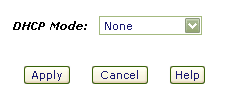
Alternatively, create a new dhcp range somewhere away from your regular static IP's, handy for guests and what-not, perhaps 192.168.1.50 - 192.168.1.99
Fortunately, assigning a static IP is very easy to achieve, and the same principle applies to every computing platform, the only real difference being where to apply the settings. I'll start with the best place, your gateway router..
At The Router..
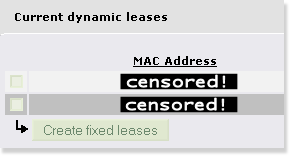
Many routers allow you to create something called a "static lease" or "fixed lease".
I recommend you try this first!
Essentially, this ties a MAC address (the physical address of your network card, theoretically unique to your card) to a particular IP address, so it always gets assigned the same local IP address. It's like a static IP, but with NO setup on the computer required. This has many advantages.
Firstly, you don't have to mess with ANY of your computer's network settings, ever. Because the router is always going to dole out the exact same address to that computer (with that particular MAC), the usual DHCP settings will work fine. Your computer asks for any address, and always gets given the exact same one.
It's not possible to give many specifics, because each router is different, but I can tell you that if you use IPCop as your gateway (A Very Good Idea), it's as simple as clicking one of connexions in the "Current dynamic leases" list, and pressing "Create fixed lease", in the DHCP server page. Two clicks, and you're set for life!
In some routers it's called "Address Reservation". Whatever its name, if it exists it will likely be in your local (LAN) network/IP settings tab/section.
In OpenWrt, the settings you need are in Network Tab, "DHCP and DNS" sub-tab.
I prefer to edit the OpenWrt config files directly (it's so easy these days!), adding something like this..
/etc/config/dhcp## Fixed Lease..
#
config host
option name 'myhost'
option mac '03:E5:A1:B6:10:C4'
option ip '192.168.0.20'
Whatever router you have, it's worth getting this setup (and then making a backup of your router's settings - there's always a tab for this!). You even can reinstall your computer's operating system, reboot, and there is your static IP again! "Zero Config".
If for some reason this isn't available to you, you can set a Static IP Address on your computer..
Windows®..
The dialog you are looking for is here.. Control Panel >> Network Connections >> Local Area Connection >> Properties >> TCP/IP >> Properties
*phew*
In other words, open the control panel, open Network Connections, right-click the "Local Area Connection" (unless you've renamed it to something else) and chose "Properties", then (in the "general" tab) select "Internet Protocol(TCP/IP)" and click the "Properties" button. Check the "Use the Following IP address" checkbox and enter your desired IP address. If you use 192.168.1.3 as your IP address, the dialog will look something like this..

..which is a clever screencap, showing you just how to get there. When you're done, okay everything to close all the dialogs. It's smart to use 192.168.1.3 as your address, especially if you plan to use any of the ready-made script kicking around here.
I you are plugging your computers into a network switch (Good Idea!), it's also smart to plug each machine into its corresponding CAT-5 socket, router (192.168.1.1) into the first, 192.168.1.3 into the third, and so on, so you can see which is which at-a-glance.
Mac OS X..
What you need is in the "Network" dialog of the System Preferences, and will look something like this..
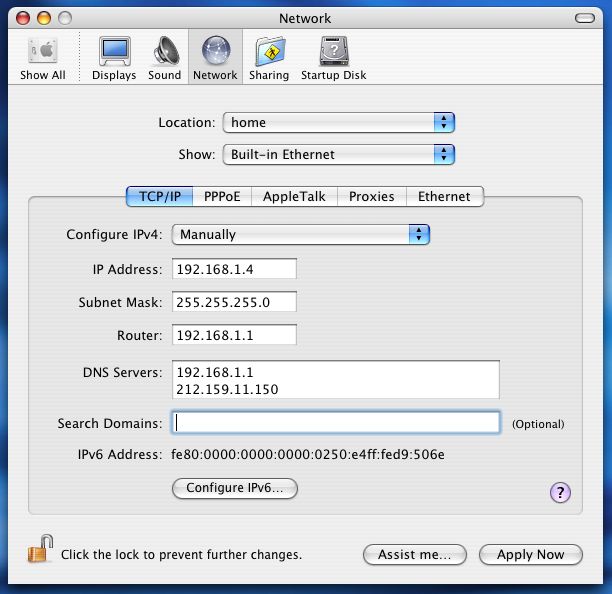
Simply click the drop-down menu for "Show", and choose "Built-in Ethernet" to get that screen, enter all the details as above. Click "Apply Now", and you're done!
Did you notice that on the Mac, you enter the Router's address into a space labelled as "Router", whereas, on Windows, you enter it into a space labelled "Default Gateway"? But then, the space for DNS servers is clearer in the Windows box. Seems we all still have a lot to learn from each other.
Linux..
This probably isn't necessary, most Linux users know how to alter this stuff, but I suspect one or two may not. Usually you need to edit some plain text file (as root). On some Linux systems, the settings will be in /etc/rc.d/rc.inet1 (or whatever interface you are using), or possibly /etc/network/interfaces. I guess it might look something like this..
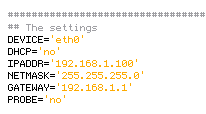
Usually, your distro will have a utility for setting up your network, and one of the first things it will ask you, after you tell it you want "manual" and not "automatic" configuration, is what IP address to assign to the machine. It's usually called something like "Network Configuration", or "inet configurator" or whatever. you'll find it! In a shell you can probably do "netconfig", "netcfg", "Ifconfig", "neat", or "netset" (depending on your distro). Same story for UNIX, Solaris, BSD, etc..
That's it!
From now on, your machine will always be reachable at your chosen address. NAT rules will be permanent, and you can dabble in all sorts of interesting and esoteric communications devices, servers and p2p applications.
If you have a few computers on your private network (LAN), you might want to consider giving them all names to go with their permanent addresses, so you can reach them by typing "workshop" or something into a telnet session/web browser/whatever. You could telnet to your router by simply doing telnet router, for instance. If you develop web sites, this is near essential. See here for more details.
If you like, you can leave feedback (I thought it was about time this page had comments of its own - folk are coming straight here from the search engines, and it's getting popular!). If this page didn't help you, tell me about it!
Have fun!
;o) corz.org
notes..
If you were actually wondering how to get a static IP for your whole internet connexion; aka. external IP, aka. "WAN IP"; perhaps to run some live web site or interesting server from your home or office, well, that's not something we mere mortals can do from our side of the router. You will need to talk to your ISP. Note: Not all ISP's offer this service, and those that do will usually charge a premium. However..
Most people do not need this!
Even those that think they do, or have been told they do. Instead, perhaps you simply need to..
Note: DynDNS no longer offer a free service to new customers. And No-IP now require you to manually confirm your domains every 30 days, which is complete nonesense. So unless you want to pay for your DDNS or lose your domains the next time you are on holiday or just forget, I recommend the aforementioned duck dns, freedns.afraid.org, or zoneedit.com, instead.
Note: If you do use zoneedit, remember to check your subdomains aren't available to the "pool"!
Note, too: you can always get your current external IP address, a-la "what's my IP", except in plain text, right here. Very handy for automatic shell scripts, and more. Right now, it's
216.73.217.13.
1. This is very similar to the way you get a new external IP whenever you dial-up to the internet (some folks still do that) or disconnect your ADSL for a few minutes2 (less scrupulous net citizens use this "feature" regularly!).
2. Although it's usual to get a new external IP when you reconnect your DSL, it's not guaranteed. With some ISP's it happens rarely, with others you need to disconnect for a few minutes or more, with some ISP's, you always get a fresh IP with each connect, no matter how quickly you do it. One thing is certain, though; unless you are paying them for a static IP, your current external IP address will change!
3. Remember, your external IP, and your local computer's IP, are two totally separate things (well, in this context). Almost no one needs a static IP for their external connexion, but almost everyone who wants to run peer-to-peer applications, ftp servers, and so on, will need a static IP for their local computer. The former is supplied by your ISP, the latter is down to you.
Useful Links..
FAQ..
What is an IP Mask? And how do they work?
The IP Mask simply describes which parts of an IP address are not going to change.
IP addresses are currently 32 bit, expressed as four sets of 8-bit numbers (0-255), or "octets". Simply, 255 means none of the bits can change, 0 means all of the bits can change (it can also be any number in between). What sometimes confuses, is that IP Masks can be expressed in two different ways..
IP: 192.168.0.<some valid number here>, Mask: 255.255.255.0
and..
192.168.0/24
Are exactly the same. While the first is, if you understand what I've said so far, fairly obvious; the second needs a little explanation.
If you remember that IP addresses are 32 bits, 4 sets of 8-bit numbers, you might realize that the second number simply states how many of those bits will be masked; in this case, 24 of the 32 are masked (cannot change), which is the first three sets, i.e. 255.255.255.0.
Any address using this mask, will be 192.168.0.something
See?
What's the difference between a public and private IP Address?
We did this! Okay, in short, your GATEWAY has your Public IP address, and your desktop computer (and any other machines inside your home/organization) have private IP Addresses. Simply put; it's outside and inside. Anyone "out there" can see your public IP, but only machines inside your own network know each other's individual private IP addresses.
.. So, let's say a packet of data from "out there", is trying to reach your machine; it could be a legitimate connexion from a client, maybe an FTP client, or some game player, or script-kiddie, or you trying to access your bedroom's WebCam, or whatever. It leaves their machine, and starts its journey, hop-to-hop, attempting to get to yours.
"Out There", is the internet. When you first connected to the internet, via your ISP's backbone, they assigned your connexion an IP address (or more than one, in some cases) from a large pool of IP Addresses they own. Any machine sending you a packet of data can reach you at this IP.
Some folk pay for a static IP, most folk get a dynamic IP; that is, whatever's currently available from the ISP's IP pool, but either way, whatever IP your ISP gives your connexion becomes your Public IP Address. Every time you access a web page, or FTP site, or game server, or announce yourself to a torrent tracker, or anything; that is the IP Address they see at the other end of the connexion, and that is the address they will send the packets back to. This is your Public IP Address.
Up until that packet reaches your gateway machine, it is in the public domain. Anything could happen to it. Once that packet hits your gateway machine, it enters the private domain and what happens next, is up to you..
If your gateway machine is a router, or better yet, a dedicated gateway appliance like IPCop, or Smoothwall is, then you have an array of possibilities. The packet may be on a port you don't know, or don't allow, and may be immediately dropped by your gateway's firewall.
Or it may be on a port your gateway machine recognizes, like the return data from a web page you requested, or your torrent port, or whatever, and the gateway device will have been programmed to forward that packet on to a Private IP Address, another machine inside your network, your desktop, or wherever. The gateway's firewall usually does most of this automatically, sorting out which machines asked for what data, but can also be programmed to forward specific traffic to specific machines, for example, when we create port-forwarding rules for P2P clients on our desktop computers.
Your Private IP Address is known only to machines inside your own network. If you have lots of machines inside your network, they will each have different private addresses, and with a secure gateway, none of these addresses can ever be seen from the outside (unless you hand it out, for example, in your email headers).
This is why if you broadcast your Private IP to a distant server, e.g. 192.168.1.3; the requested data would never return, having been sent to a machine most likely sitting in the exact same building as the distant server, if such a machine even exists.
I want to host a REAL domain! A REAL site! I NEED an external Static IP!.. Don't I?
No, so long as your hardware (computer/network/connexion/bandwidth allowance) can handle whatever kind of site you plan to host, it's easy enough to point a proper TLD* at a dynamic IP address. While not recommended for mission-critical applications (there will always be a brief spell after you are assigned a new IP, where the name still points to the old IP - these days increasingly briefer, as DNS systems improve), hosting a "real" domain from a dynamic IP is most definitely doable.
Once you have purchased (registered) your domain name, you simply need a way to keep it in sync with your ever-shifting dynamic public IP address.
Check out zoneedit.com, a free service which does exactly that. Just like dnydns.org et al, you run your DUC and it keeps your domain name pointing at your IP address. And if you head along to namecheap.com, you can even register your domain, and setup dynamic DNS all at the same time. This is a fine place to add that I consider namecheap to be the best domain registrar in the world.
* okay, technically only the "com/org/net/etc." part is the actual TLD, but the acronym has dropped itself into common parlance meaning "a proper (not-sub) domain", like "corz.org" or "ampsig.com" is. Okay, I might have pushed a little. ;o)
<Insert any question here>
When troubleshooting network issues, I usually get my solutions following one simple rule.. "Think like a packet of data". As breathtakingly simple as this sounds, imagining yourself as a packet of data, traveling from A to B is the fastest way to figure out where the trouble lies. That's all there is to it! Try it; you will not be disappointed with the results.
Troubleshooting..
A number of things can go wrong when trying to configure a static IP on your local machine. The most common issues are..
A second network adapter on your computer already has that IP address assigned to it. Note: Firewire (aka. 'IEEE 1394') adapters usually get automatically setup as network adapters in Windows. Unless required, it is generally best to disable these interfaces.
Another computer on your local network already has the IP you are attempting to assign.
Another Very Good Reason to configure all your static IPs at your router, and leave the individual puters' default DHCP settings as-is.
You do not have sufficient security privileges to make such a change (i.e. you are not the Administrator/admin user)
Check these things, and if you're still having difficulty setting up a static IP on your local computer, feel free to leave a question below. It might be something other's could use an answer to.
Before you ask a question..
Firstly, read this at least once in your life. I insist!
NOTE: THIS IS NOT A COMMUNITY. And I am not your free tech dude.
If you can't be bothered to read the article, I can't be bothered responding. Capiche? I do read all comments, though, and answer questions about the article. I'm also keen to discuss anything you think I've missed, or interesting related concepts in general.
Questions which having nothing to do with local Static IP addressing will be deleted, which also doubles as your answer! This also goes for questions asking for an email reply.
If you are still sure that you want to post your own, personal, tech question, then please ensure that you first, either..
a) Have read the article (above) and have tried "everything" yourself; or else..
b) Pay me. The PayPal button is at the top right of the page.
Just an FYI/comment sort of thing.
You mentioned external static IPs, and said they couldn't be achieved from our end of the router...which is technically true, but it's entirely possible to pay a small monthly fee to host a private VPN server in the cloud. I've done this to host mail and web servers that exist in my home over a residential-type ISP account. The price differential compared to a "business class" account with an ISP is rather sweet. It's also cheaper than hosting multiple virtual machines in the cloud. Slight performance hit, maybe, on the network front when compared to a normally-obtained static IP. OTOH, the memory/storage side of things is cheaper with my own hardware.
hi, thanks for this article though i may not fully understand it cause i am a newbie here with regards to understanding a dynamic and static ip address.. i recently set up an ip cameras inside our house so i can monitor it remotely when i am outside of our home. so after 36 hours of research on how to configure my ip cameras with our router i finally made it work, then i recently read that setting up a static ip address is not free at all, does that mean my internet provider will charge me on my next billing about these static ip addresses i made in the configuration? Currently i have an active account with my.noip.com website for a year. Do i have to use the dynamic address instead? i hope what i am asking makes sense as i do not fully understand these things, i just followed a set of instructions in the internet on how to configure my ip cameras, currently i managed to set up 4 ip cameras with their own different corresponding static ip addresses. please enlighten me about this, thanks!
Obtaining a static IP from your ISP is not free.
"setting up" static IP's within your own network, is completely free, aside from the cost of the time involved.
You would have been quicker coming straight here.
;o)
I am also a newbie at this. I currently have an external static IP address through my satellite ISP.(yes we live in the sticks, satellite is the only option.) I need a static IP to monitor a camera system remotely. because we are on satellite we cannot have the faster service if we have a static IP. If I set up the static IP internally instead of externally will this work to remote view the cameras? Is it as secure as the external static IP address? It would certainly make my life better if we could get the faster service but giving up the remote viewing is not an option. I have a Linksys router if that makes a difference.
Thank you for your article and any help you can provide.
;o)
Hello, i need a static ip address for my business but don't want to get it with my ISP because they require i rent their equipment, do you know of any low cost static ip providers i can get an ip address with but still keep my ISP and use my own router?
Hi there, lovely article Cor.
I have the same problem as a previous questioner "Clairese - 13.09.15 5:42 am".
I have a project to create a website on Wordpress.org and I have Siteground as my hosting provider. Due to the problem of being constantly logged out of my account with Siteground their tech assistance stated that I was being logged out because my IP address was dynamic and that I should see my ISP for a static IP.
Being poor I began looking for alternative solutions.
I have changed my local dynamic IP to a static IP outside the "pool" in the dynamic section. But, by using "Whatsmyipaddress" I see that my external IP is constantly changing. I tried to override this by using Avast vpn and logging in from a different IP. Unfortunately no luck.
"No IP" seems a solution but as I'm not remotely connecting to cameras or the such I'm not sure if it's the answer.
My external IP is bouncing back and forth between Vietnam and Cambodia, I'm based in Cambodia, at a rate of a new external IP every minute or so. I am not exaggerating. Even whilst writing this I see my vpn disconnecting and reconnecting and using the internet is a frustrating exercise nowadays.
Is this normal?
Is there another solution other than contacting my ISP and paying for a static IP, which if I've understood your reply to Clairese, isn't the problem?
I've re-read Clairese's question and curiously I also have TP-Link.
What does your router log say? Is there something causing it to reconnect every few minutes?
Many routers, by default, will "connect on demand" (i.e. when you ask visit a web site) and then time-out the connexion after a few minutes. Have you checked that your router is instead set to STAY connected? If not, do that. Mine is a dynamic connexion but I often have the same IP address for weeks.
Setting a local static IP for your machine has no effect here. Only the external IP address matters to your hosts. The one your router gets from the ISP.
A VPN isn't so useful here, unless you know the IP address at the other end won't change; for example, a direct VPN to a home or company (i.e. in the UK) that does have a static IP address (or more reliably dynamic IP) would probably work much better.
Check your router first - there may be something obvious there causing you to keep reconnecting.
;o)
Sir
From Which Number Static ip starts
and From which number Dynamic ip starts
I recommend you create logical "blocks" for your various devices, and another block for dynamic addresses. Most people only need a small block.
;o)
Question: is a static IP required to run abridged "private" network over the "web"
context: I worked for an organization where you could leave office "A" and enter office "B" in different city and by rejoining the office wifi were RElinked to every other office as if still at desk in office "A" all network drives and peripheral devices work, no log in required. Just join the wifi in "organizations" office.
Reason for question:
ISP for "MY" now new business says I require static IP for every office I have in order to do this same thing. Over four locations this is a big bump in cost from my ISP to make this seamless transition for staff? But I'm no computer guru and don't want to pay for what I don't have to.... Not that I want to pay what my ISP wants for this added convenience! I think there just trying to get me to "pay" for my future free tech-support...
To my mind, however, the very essence of VPN is that you can run a private network over whatever network and requiring static IP addresses is arcane, limiting and shows lack of skill and/or imagination on the part of the IT staff.
Your secure VPN login should be enough (if it is secure). I would ask them if there is a way to get their system "upgraded".
;o)
I thanks for this and other articles. I have a large hard drive which I access from a remote server. I use at the moment FileZilla. My ISP is orange as I live in France. When the IP changes then of course FileZilla stops functioning.
I need a fixed IP. Can you advise. I am willing to make a payment for a solution.
Peter Vella
;o)
Dear Tech,
Thanks for your time
When I do a whatsmyipaddress.com, is this the ip that I would put in my router as the internet
connection IP?
I'm trying to set up a older cisco 881 router and not sure what to put on the interface.
And what about the gateway for the route? How can I find that?
The address that comes up when I do the whatsmyipaddress.com is 173.173.*.*.
Not sure what the subnet mask would be - maybe 255.255.255.252?
My ISP does not seem to know or want give it out.
So to summarize
1. which IP to use on the interface the ip address or the gateway
2. how to get the gateway address for 173.173.*.*
3. How to know what the Subnet mask is for 173.173.*.* ( 255.255.255.252 ) guessing
Any input you might have will be greatly appreciated.
Thanks you!!
Jim
Sherlock? Is that you?
Thanks for this poetic explanation of highly technical topic.